
A digital prescription in India is legal when a registered medical practitioner issues it with the required details, and the right tool depends on where you practise. Solo doctors need speed. Hospitals need the prescription inside the wider patient record. Doctors who dislike typing need voice or stylus input. A good pick produces a valid prescription in under a minute, keeps patient data secure, and does not force you to change how you work.
The problem is that searches for e-prescription software return tools built for very different buyers, with little on the rules. A prescription pad app for one doctor and a hospital documentation system solve different problems, yet the same legal checklist applies to both. This article covers four options: PurpleIPD for hospitals, MyRx for solo and small clinics, SimboAlpha for voice-first workflows, and Lifemaan for doctors who prefer a stylus. It then sets out what makes an e-prescription valid.
We make PurpleIPD, so it comes first, and we say plainly where it does not fit. The other three are described from what each vendor says about itself, so confirm details with them before you buy.
1. PurpleIPD
PurpleIPD is the pick for hospitals that want prescriptions inside the same record as case sheets, consent, and lab reports.

How it works
PurpleIPD is paperless inpatient software from PurpleBits Infosystems in Vadodara. Doctors write on digitised versions of the hospital’s own forms using a stylus on standard Android tablets (Samsung or Lenovo). Doctor-friendly digital prescriptions are part of its integrated OPD and IPD documentation.
- Stylus and keyboard input are both supported, and data is entered during the round, not after.
- A real-time audit trail tracks every change, login, and access.
- Role-based access control and encryption protect patient data.
- It runs on the hospital LAN with no internet dependency.
- It connects with ABDM and HCX and works alongside your existing HIMS, lab, and billing systems.
Who it suits and what to check
It suits mid-sized and large hospitals with inpatient wards that want OPD and IPD documentation in one place, and that need to stay ready for NABH audits. It is not for a solo clinic that only wants a prescription pad app.
Implementation takes 6 to 8 weeks, and the team configures your existing paper forms. Pricing depends on the number of tablets or beds, with custom quotes on request. In a demo, ask how prescription templates and drug lists are set up for your doctors.
A prescription is only as useful as the record around it.
2. MyRx
MyRx is a prescription-first tool for solo doctors and small clinics that want the fastest route from consultation to printed prescription.
How it works
MyRx describes itself as India’s simplest prescription management application for doctors, with a built-in EMR. It promises that you can write a digital prescription in about 30 seconds. The flow is short: pick the patient, add medicines, then print or share.
Because it bundles an EMR, past visits sit next to the prescription. Repeat patients should take less time, which matters most when one doctor sees many patients a day.
Who it suits and what to check
It suits solo practitioners and small clinics where one person writes most prescriptions and no hospital system needs to connect. Hospitals with wards and several departments will likely outgrow a tool of this kind.
Before you commit, check that the printout shows your registration number and signature. Also ask about the drug database, data export, hosting location, and pricing. We have no verified pricing for it, so get the figures from the vendor.
For a solo doctor, a prescription tool wins or loses on seconds per patient.
3. SimboAlpha
SimboAlpha suits teams that want voice dictation to produce the prescription, especially hospitals and developers who embed it in their own software.
How it works
SimboAlpha describes itself as AI-enabled speech-to-text that creates ePrescriptions in under 30 seconds. It is delivered as a cloud-based API that returns structured data. It appears among partner offers on the ABDM website.
The doctor dictates, and the software turns the speech into a structured prescription with medicines and dosage fields. An API is usually a building block, so expect to connect it to an existing system, not use it as a standalone app.
Who it suits and what to check
It suits hospitals, health-tech teams, and busy clinics with heavy dictation. Test it with your own doctors, because Indian accents and mixed Hindi-English speech are the real challenge.
Check how accurately it captures drug names and doses, and whether the doctor can correct the text before signing. Since it runs in the cloud, ask where patient data is stored and how that fits your data protection duties.
Voice saves time only when a doctor can correct it faster than they would have typed it.
4. Lifemaan tablet writing
Lifemaan suits doctors who want to keep writing by hand but need the result stored digitally.
How it works
Lifemaan’s tablet writing feature lets Indian doctors write prescriptions on a tablet with a stylus. The handwritten prescription is captured and stored digitally. There is almost no learning curve, because the doctor’s habit stays the same.
The catch is what gets stored. A captured handwriting image is not the same as structured data. An image is easy to read only if your handwriting is, and it may not be searchable by medicine or diagnosis.
Who it suits and what to check
It suits experienced doctors with fast, steady handwriting who resist typing or dictating. Clinics that want a gentle move away from paper also fit.
Ask whether medicines are recorded as searchable data or only as an image. Confirm that your registration number and signature appear on every file. Try it with your own handwriting on your own tablet before you buy.
A stylus keeps the habit, but check whether you get an image or searchable data.
Digital prescription rules in India: what makes one valid
An e-prescription is valid in India when a registered medical practitioner issues it and it carries the required details. The main reference for remote care is the Telemedicine Practice Guidelines of 2020.
What the law says
The Telemedicine Practice Guidelines allow a doctor to share a photo, scan, or digital copy of a signed prescription, or an e-prescription, after a teleconsultation. The Information Technology Act, 2000 gives legal recognition to electronic records and digital signatures.
The guidelines address teleconsultation. For in-person visits, a printed prescription from software is common practice, but the doctor must still sign it and show a registration number. Check current requirements with your state medical council.
What a valid e-prescription contains
Make sure your tool includes these fields every time:
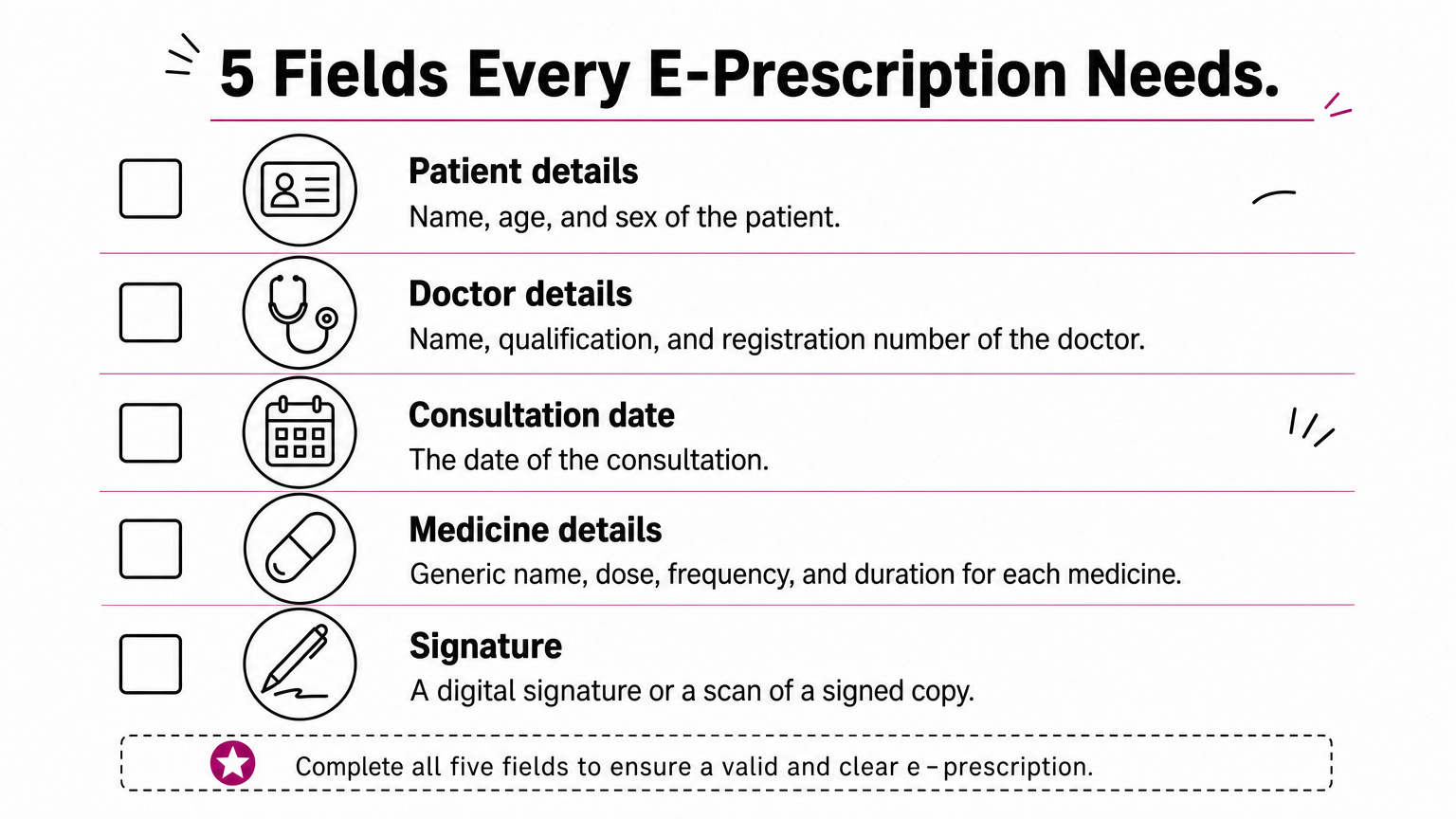
- Patient name, age, and sex
- Doctor name, qualification, and registration number
- Date of the consultation
- Medicine names (generic names, written legibly), dose, frequency, and duration
- A signature, either digital or a scan of a signed copy
Drug categories and patient data
The guidelines sort drugs into lists that limit what you can prescribe remotely.
| List | What it covers | Remote prescribing |
|---|---|---|
| List O | Common, over-the-counter type drugs | Allowed in any consultation |
| List A | Commonly used, relatively safe drugs | Allowed at a first video consult and at follow-ups |
| List B | Drugs for continuing treatment | Follow-up consults only |
| Prohibited | Schedule X and narcotic drugs | Not allowed by teleconsultation |
Patient records are also personal data under the Digital Personal Data Protection Act, 2023. Ask any vendor where data is stored, who can access it, and whether every change is logged.
If your tool cannot print your registration number and signature, it is not ready for use.
Choosing a tool that fits your clinic
Pick by practice size. Solo doctors should look at a fast prescription app like MyRx. Voice-first teams can test SimboAlpha, and stylus writers can try Lifemaan. Hospitals that want prescriptions, consent, labs, and discharge documents in one record need a documentation layer, not a pad app.
Whichever you choose, check the same basics: registration number and signature on every prescription, structured data, secure storage, and a clear audit trail.
If you run a hospital and want to see how digital prescriptions work alongside paperless IPD files, book a PurpleIPD demo and bring your own forms to the session.
