EMR electronic medical records are the digital version of the patient chart that one clinic or hospital keeps. An EMR holds diagnoses, medicines, allergies, vitals, lab results, visit notes and billing codes for each patient. The staff of a single healthcare organization create and use it. If you have ever watched a doctor flip through a paper file, the EMR is that file, searchable and always legible.
This guide goes past the definition. You will see why EMRs matter, what studies say about their effect on time and cost, how an EMR works from the front desk to the bill, and how it differs from an electronic health record (EHR). You will also get a rollout checklist that you can use in a practice or a hospital.
PurpleIPD builds paperless inpatient documentation software for Indian hospitals, so we see the practical side of this topic often. Many hospitals have billing and registration software but still chart on paper in the ward. That gap shapes the last section of this article.
Why EMRs matter for patients, staff and cost
EMRs matter because they turn the patient chart into something legible, always available and checkable. That cuts avoidable errors, speeds up routine work and gives management data that paper never could.
What electronic records fix that paper cannot
The classic example is handwriting. A pharmacist who reads a 10 mg prescription as 70 mg can harm a patient, and a typed order removes that risk. Paper files also get lost, damaged or filed in the wrong cabinet. A doctor then treats a returning patient without the history. An EMR retrieves the chart in seconds and lets several authorized people read it at once.
The second gain is structure. Entries are coded fields rather than loose prose, so the system can prompt staff, warn about drug interactions and check that required paperwork exists before discharge. The Institute of Medicine’s 2003 list of what an EMR should support is still a good yardstick:
- Access to diagnoses, allergies, lab results and medications
- Computerized order entry for tests and prescriptions
- Decision support that flags drug interactions
- Secure communication between providers and patients
- Computerized administration, such as scheduling
- Standards-based data storage and reporting
What the studies say about time and money
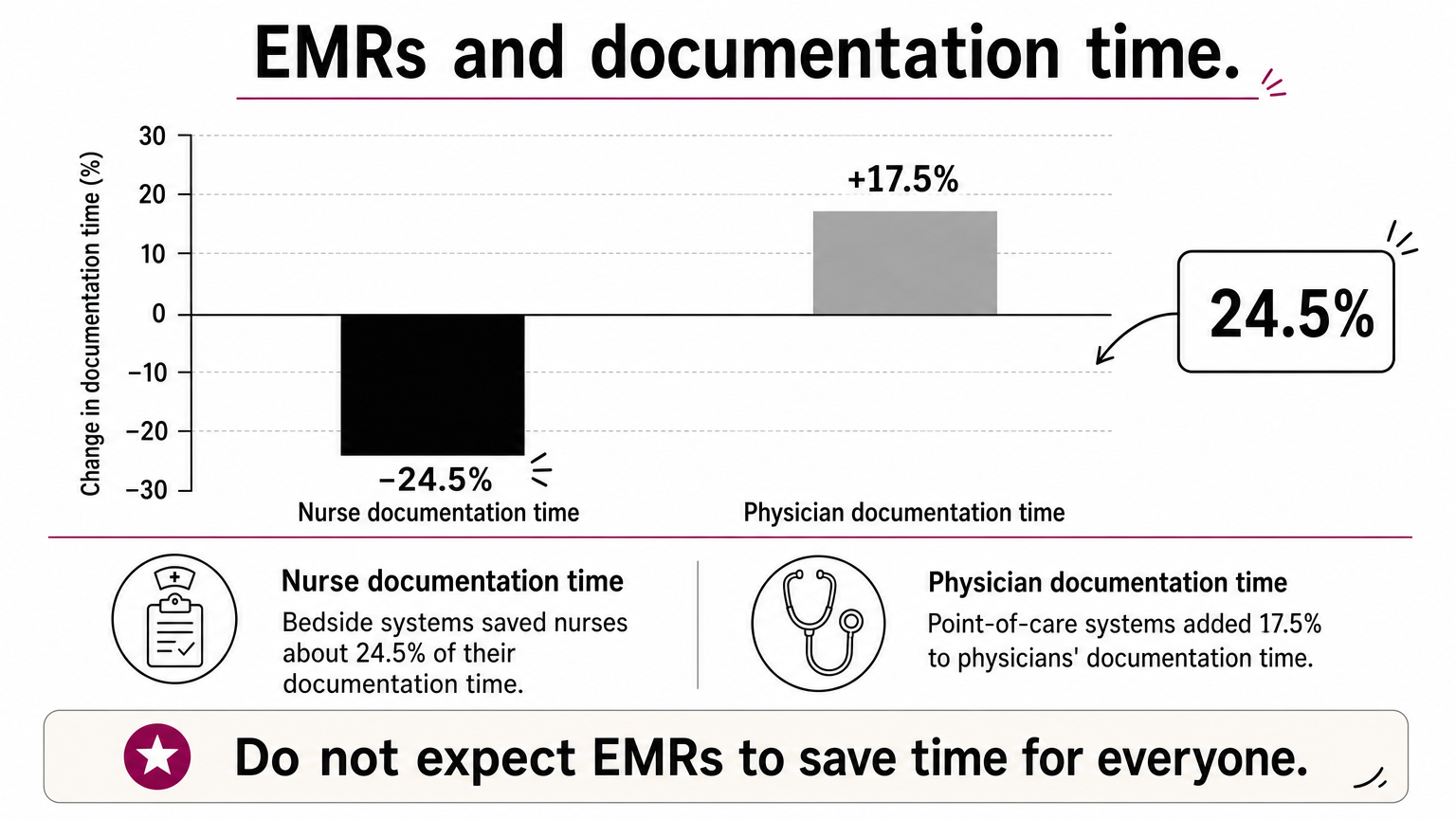
Do not expect electronic medical records to save time for everyone. A time-motion study in five primary care clinics found that physician time per patient moved from 27.55 to 27.05 minutes, which is essentially no change. A systematic review of 23 studies found that bedside systems saved nurses about 24.5% of their documentation time. Point-of-care systems added 17.5% to physicians’ documentation time. Studies run soon after go-live tended to show savings, and later ones tended to show increases.
Cost is the other hurdle. A US case study of 14 small practices, now dated, found initial costs averaging $44,000 per full-time provider and ongoing costs of $8,500 per provider per year. The average practice paid back its costs in about 2.5 years. For a three-provider clinic, that works out to $132,000 upfront and $25,500 a year. Treat the dollar amounts as old US figures and take the shape as the lesson: heavy early spending, slow payback, and some practices that could not cover costs quickly. The usual causes were unplanned workflow changes and a shortage of skilled support staff.
The real return on an EMR is better quality and safety, not fewer minutes at the desk.
How an EMR works during a patient visit
An EMR works by collecting each step of a visit in one chart that every authorized staff member updates in turn. The patient never sees the chart move, but at every stage someone adds to it and the next person reads it.
From registration to billing
This table shows a typical outpatient visit in a practice that runs on electronic medical records.
| Stage | What gets recorded | What the EMR does |
|---|---|---|
| Registration | Identity, contact details, insurance or scheme details | Creates or retrieves the chart |
| Triage | Vitals, weight, complaint, allergies | Stores values as fields and flags abnormal ones |
| Consultation | History, examination, diagnosis, plan | Offers templates and suggests codes |
| Orders | Lab tests, imaging, prescriptions | Sends the orders and checks drug interactions |
| Results | Lab values, reports, images | Attaches results to the chart and alerts the doctor |
| Billing and follow-up | Codes, charges, next appointment | Passes codes to billing and schedules a recall |
The doctor’s note, the lab order and the bill all draw on the same chart, so data entered once serves all three. In a paper practice, a different person rewrites each of them. That is also why incomplete entries at one stage cause trouble at the next, such as a missing diagnosis code that delays a claim.
What sits inside the record
An EMR stores two kinds of data. Structured data includes vitals, medication lists, diagnosis codes and lab values. Unstructured data includes free-text notes, scanned documents and images. Structured fields are what let the system alert, report and audit, so the more you enter as fields, the more the software can do for you.

A good EMR also logs who viewed or changed each entry and limits access by role. A billing clerk should not read clinical notes that a nurse can. Everything stays inside the organization that created it. That boundary is what separates an EMR from an EHR.
An EMR is not a digital filing cabinet. It is a workflow that happens to leave a record behind.
EMR vs EHR: the difference that matters
An EMR is the digital chart of one practice or hospital. An EHR is built to follow the patient across organizations. The data can look similar, but who can read and add to it is different.
Side-by-side comparison
| Feature | EMR | EHR |
|---|---|---|
| Scope | Chart of one practice or hospital | Whole-patient record across care settings |
| Who can access it | Staff of that organization | Authorized providers at many organizations, often the patient too |
| Data sources | Your own visits, orders and results | Your data plus labs, pharmacies, specialists and other hospitals |
| Sharing | Usually printouts or file transfers | Designed for electronic exchange |
| Best for | Running care and billing inside one organization | Coordinating care across providers |
Without an EHR, a patient or clinic has to arrange the transfer of records to each new provider. The receiving provider then has to merge the new information into their own copy. An EHR automates that handover.
Why the labels blur in real life
Many people use the two terms interchangeably, and software vendors often do too. A product sold as an EMR may exchange data with other systems, and one sold as an EHR may never leave a single hospital. Do not trust the label. Ask what the system exchanges, with whom and in which format.
Hospital information systems (HIS) add another layer of confusion. An HIS usually covers registration, billing, pharmacy and inventory. An EMR covers clinical documentation. In India, the push for sharing comes from the Ayushman Bharat Digital Mission (ABDM). It uses ABHA health IDs to link a person’s records across providers, so a hospital that keeps clean, structured records is better placed to take part.
If a system cannot send a patient’s record to another provider in a standard format, it is an EMR, whatever the brochure calls it.
How to implement an EMR without disrupting care
Implement an EMR in phases, with a named clinical champion, measurable goals and a tested technical setup. Published guidance on rollouts groups success into three areas: team, tactics and technology.
Build the team and set measurable goals
Appoint a physician champion who motivates colleagues and a project manager who keeps the schedule. Involve nursing, billing, records and IT from the start, because each group will change how it works. Then set goals that you can measure, such as the number of charts completed at discharge, average discharge time or the share of orders entered electronically. Vague goals like "go digital" cannot tell you whether the rollout worked.
Expect resistance and plan for it. Ask the same questions of any new tool. Can we try it on one ward first? Does it fit our existing practice? Can staff see it working elsewhere? Is the change small enough to learn quickly?
Roll out in phases and prepare the technology
Use this checklist before and during go-live:
- Start with one department or ward, then expand
- Decide how to handle old paper records, such as scanning only active patients
- Lighten clinical workloads at go-live and for a short period afterward
- Check network speed and availability in every room where staff will work
- Keep a test environment that mirrors the live system
- Maintain servers, schedule backups and write a disaster recovery plan
- Enter data electronically from day one rather than transcribing later
Questions to ask any vendor
Before you sign, ask these questions:
- Can you digitize our existing forms, or must we adopt your templates?
- Which of our systems does it connect to, such as HIS, lab and billing software?
- Does it keep an audit trail of every change and access?
- How does it control access by role?
- Where is the data stored, and how is it backed up and encrypted?
- Who trains our doctors and nurses, and for how long?
A rollout fails more often from skipped workflow changes than from bad software.
EMRs and inpatient documentation in Indian hospitals
In many Indian hospitals, the EMR conversation stops at the outpatient desk. The inpatient department still runs on paper files, case sheets and registers, even when billing and registration are fully computerized.
Why paper IPD files are the weak point
An inpatient stay generates far more paper than a clinic visit: admission notes, nursing charts, orders, consent forms, progress notes and discharge summaries. Each page must be found, completed and signed before a patient can leave. The result is misplaced files, slow retrieval and long discharge times, plus stationery and records-room costs that hospitals pay every year.

Audits add pressure. NABH reviewers expect complete, traceable documentation. ABDM and insurance schemes such as PMJAY expect structured, timely records. A paper file is hard to audit and hard to attach to a claim.
How PurpleIPD fits beside your HIS
PurpleIPD is paperless IPD software that works as the clinical documentation layer next to your existing HIS or HIMS. It does not replace the HIS. Staff write with a stylus on scanned versions of the hospital’s own forms or on forms made with a built-in form builder, so the workflow stays familiar. It runs on standard Android tablets, including Samsung and Lenovo models with a stylus, and works on the hospital LAN with no internet dependency. Data stays on the hospital’s own on-premises infrastructure.
The features target the problems above:
- A real-time audit trail that tracks every change, login and access
- Compliance flags for missing forms
- Video consent recording
- Lab report management
- Role-based access control and encryption
- Connections to ABDM and HCX
- AI-generated discharge summaries drawn from data entered during the stay
Hospitals have reported up to a 70% reduction in stationery costs, and VIMS Hospital cut discharge turnaround by 1.5 hours. Most hospitals are running within 6 to 8 weeks, with the PurpleIPD team configuring existing forms. Pricing depends on the number of tablets or beds.
If your HIS handles billing but your wards still chart on paper, the missing piece is inpatient documentation.
Putting EMRs to work
Electronic medical records are one organization’s digital patient chart, built so that notes, orders, results and bills share a single, legible record. They improve safety and give you data to manage with. They do not guarantee saved minutes, and they differ from EHRs mainly in who can share the record. Plan the rollout with a champion, measurable goals and a phased start, and ask every vendor what its system actually exchanges.
If your outpatient side is digital but your wards still run on paper, start there. You can see how PurpleIPD handles paperless inpatient documentation in a demo.