

A digital prescription format is the fixed layout in which a prescription is created, stored and shared electronically. It has six working parts: the doctor’s identity, the patient’s identity, the clinical context, the medicine orders, advice with follow-up, and a signature. In India, the safe baseline is the prescriber’s name and registration number, patient identifiers, generic drug names with strength, dose, frequency and duration, and a verifiable signature.
PurpleIPD is paperless IPD software for Indian hospitals, and it includes doctor-friendly digital prescriptions inside its integrated OPD and IPD documentation. That keeps us close to what a loose format causes: missing durations, unreadable drug names, insurer queries and gaps at audit time. Most of these are format problems, not software problems.
This article explains why the format matters, which elements every prescription needs, and how to build one with a layout you can copy. It then covers the Indian rules and standards behind the format, and how to choose an app or module for a hospital.
Why the format of a digital prescription matters
A digital prescription format matters because every ambiguous field becomes a dispensing error, a rejected claim or a record nobody can search. The format is the safety check built into the page.
A prescription is only as safe as its least structured field.
Legibility is a safety feature
Typing removes bad handwriting, but it does not remove ambiguity. Take the line "Augmentin 625, 1-0-1". The pharmacist still does not know how many days to dispense, whether to give it before or after food, or whether a generic can replace the brand. Pharmacies guess differently, and the patient pays for the guess.
A format with separate fields for strength, frequency, duration and food instruction removes that guess. Better still, it can refuse to save a prescription while a field is empty. Missing duration and a missing allergy line are the two gaps that mandatory fields catch most reliably.
Hospitals need records that survive audits and claims
For a hospital, the prescription is part of the clinical file. NABH assessors, TPAs and PM-JAY reviewers read it to confirm that the medication orders match the diagnosis and are dated, timed and attributable to a named doctor. A fixed format answers those questions from the file itself.
A loose format invites a query, and every query delays a discharge or a claim payout. The format therefore protects both patient safety and hospital cash flow.
A fixed format makes data reusable
Once fields are structured, you can search by drug, count prescriptions by diagnosis, check an order against a recorded allergy, and pass the record to another system. A scanned image or a free-text note cannot do any of that.
This is also why the choice of format comes before the choice of tool. A good app with a vague template still produces vague records.
Required elements of a digital prescription
A complete digital prescription has ten elements, grouped into a header, a patient block, a clinical block, a medicine table and a footer. The table shows what each one holds and why it is there.
The elements at a glance
| Element | What it holds | Why it matters |
|---|---|---|
| Doctor details | Name, qualification, registration number and council, hospital or clinic, contact | Identifies the prescriber |
| Date (and time for inpatients) | Date of issue, plus time for hospital orders | Fixes the order in the treatment sequence |
| Patient details | Name, age, sex, mobile number, UHID or ABHA number | Links the prescription to the right person |
| Allergies and weight | Known drug allergies or "none known", weight for children | Prevents unsafe drugs and wrong doses |
| Diagnosis or complaints | Chief complaints, provisional or final diagnosis | Gives context to the pharmacist and the insurer |
| Medicines | Generic name, strength, form, route, dose, frequency, duration, instructions | The actual order |
| Investigations and advice | Tests, diet, rest, warning signs | Completes the treatment plan |
| Follow-up | A date or a condition such as "if fever persists beyond 3 days" | Brings the patient back at the right time |
| Signature | Scanned, stylus-written or digital signature | Proves the doctor issued it |
| Prescription ID or QR | A unique number or code | Lets a pharmacy or hospital verify it |
Make doctor details, date, patient details, allergies, medicines and signature hard-stop fields. The rest can be optional, depending on the specialty.
How to write the medicine line
The medicine line is where most errors start, so give it a strict order: generic name first, with the brand in brackets if you want it, then strength, form, route, dose, frequency, duration and instructions. Use plain words or standard abbreviations such as OD, BD, TDS, QID, HS and SOS.
Avoid the abbreviations that cause known errors. Write "daily" instead of QD, and "units" instead of U. Write "0.5 mg" with a leading zero, and "5 mg" without a trailing zero.
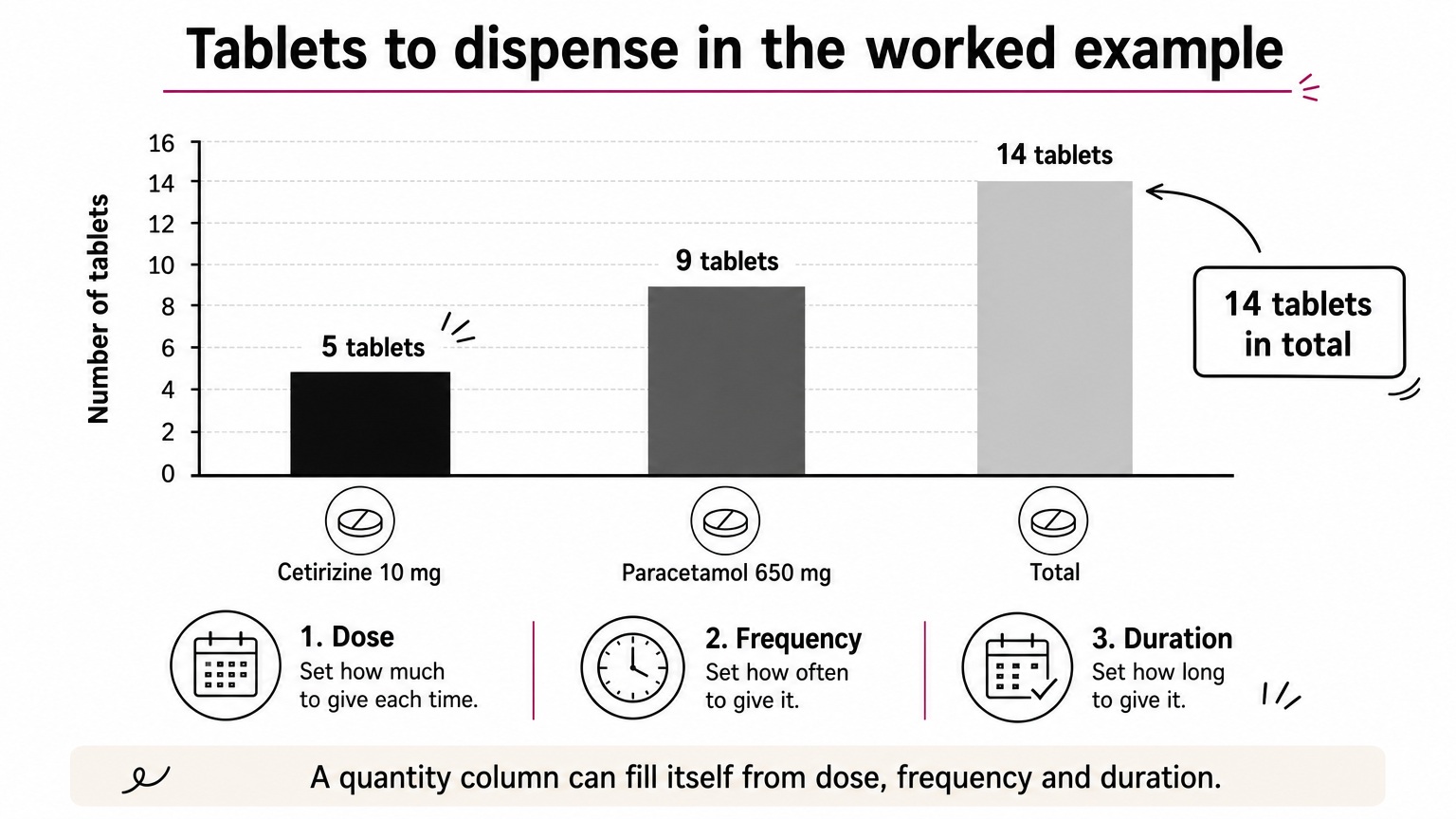
Here is a worked example. The doctor writes "Cetirizine 10 mg tablet, 1 tablet orally at bedtime for 5 days" and "Paracetamol 650 mg tablet, 1 tablet orally three times daily after food for 3 days". The pharmacist needs 5 tablets of the first and 9 of the second, so 14 tablets in total. A quantity column that fills itself from dose, frequency and duration saves that arithmetic. This example is illustrative, not clinical advice.
Signature, validity and footer
The signature can be a scanned image of the doctor’s handwritten signature, a signature written with a stylus on a tablet, or a certificate-based digital signature. Choose by how the prescription will travel. A prescription shared only with the patient can carry a scanned or stylus signature. One that moves between organisations is stronger with a digital signature.
Add a prescription number or QR code in the footer so a pharmacy or another department can verify the document. Keep the hospital address and contact details there too, so the patient knows where to call.
How to build a digital prescription format
Build the format in this order: decide where it will be used, fix the blocks, make medicine entry structured, add the signature, and test it on real consultations. The steps and the layout below work for a clinic or a hospital department.
Fix the layout on paper first, then choose the software that can reproduce it.
Six steps to a working format
- Decide the outputs. List where the prescription must go: A4 or A5 print, PDF, WhatsApp or email, and any national health platform. The most demanding output sets the field list.
- Fix the order of blocks. Header, patient block, clinical block, medicine table, advice and follow-up, footer. Keep the same order in every department so pharmacists and nurses learn one pattern.
- Split the medicine entry into fields. Give each part of the medicine line its own field or dropdown instead of one free-text box.
- Set mandatory fields. Block saving when doctor details, patient details, allergies, medicines or the signature are empty.
- Add the signature method. Pick scanned, stylus or digital, and decide who can sign on whose behalf.
- Test on real consultations. Run ten to twenty typical cases from each department, print them, and ask a pharmacist and a nurse what is unclear.
A layout you can copy
Use this as a starting point for a print or PDF template and adapt the fields to your specialty.
[HOSPITAL / CLINIC NAME, LOGO]
[Address] | [Phone] | [Email]

Dr. [Full name], [Qualification]
Reg. No. [Number], [Medical council]
[Department / Specialty]

Prescription No.: [ID]        Date: [DD-MM-YYYY]   Time: [HH:MM]

Patient: [Name]     Age / Sex: [__ / __]     Weight: [__ kg]
UHID / ABHA No.: [Number]     Mobile: [Number]
Known allergies: [Drug allergies or "None known"]

Complaints / Diagnosis: [Text]
Vitals (if relevant): [BP, pulse, temperature, SpO2]

Rx
No. | Medicine (generic) | Strength | Form | Route | Dose | Frequency | Duration | Instructions | Qty
1   | [ ] | [ ] | [ ] | [ ] | [ ] | [ ] | [__ days] | [before / after food] | [ ]
2   | [ ] | [ ] | [ ] | [ ] | [ ] | [ ] | [__ days] | [ ] | [ ]

Investigations advised: [List]
Advice: [Diet, rest, warning signs]
Follow-up: [Date or condition]

[Signature or digital signature]
Dr. [Name]    Reg. No. [Number]
[QR code for verification]
The same layout works as a Word or PDF template, or as the field map for an app. Keep the columns of the medicine table in this order. Pharmacists scan these tables in a fixed pattern, and changing the order slows them down.
Typed, handwritten or generated
There are three common ways to produce the format. Each suits a different practice.

| Method | How it works | Structured data | Best for | Watch out for |
|---|---|---|---|---|
| Typed form with drug database | Doctor picks drugs and fills fields | Yes | High-volume OPDs, data sharing | Can feel rigid for unusual cases |
| Stylus handwriting on a tablet | Handwriting is captured on a form | Ink or image unless converted | Doctors used to paper, sketches and charts | Not searchable by drug or dose |
| Template merged with data | A system fills a fixed DOCX or PDF layout from stored data | Yes, from the source record | Branded print layouts | Needs setup and a data source |
Many hospitals combine two of these. A typed medicine table sits on the same page as a handwritten note or diagram. The test is simple: ask whether the final record can answer "which patients got this drug".
Rules and standards behind the format in India
Indian practice rests on a few clear expectations: the doctor is identifiable, drug names are clear, the signature is verifiable, and patient data is protected. Standards from the national digital health programme then shape how the data is structured. Treat this section as a baseline and check the latest notifications from the National Medical Commission before you finalise a template.
The rules decide what must appear. The standards decide how it travels.
Prescribing rules
The Indian Medical Council professional conduct regulations ask doctors to prescribe generic names, legibly and preferably in capital letters, with rational use of drugs. A format that puts the generic name in its own field supports this directly.
The Telemedicine Practice Guidelines of 2020 accept a digital copy of a signed prescription, or an e-prescription, sent by email or a messaging platform. The doctor’s name and registration number are standard on every prescription. Some drugs, such as those under Schedules H1 and X, carry extra conditions. Confirm them with your pharmacy head and legal adviser before building any shortcut that auto-fills those orders.
ABDM and structured data
The Ayushman Bharat Digital Mission builds on FHIR for exchanging health records. The national FHIR implementation guide defines a Prescription Record alongside records such as the Discharge Summary and Diagnostic Report. India’s EHR Standards also recommend SNOMED CT for clinical terminology.
For you, this means a prescription with discrete fields can be mapped into that record. A prescription stored as a photograph cannot. Linking the patient’s ABHA number in the patient block is the first step toward sharing records with patient consent.
Signatures and data protection
The Information Technology Act, 2000 recognises electronic and digital signatures, which is why a certificate-based signature can stand in for ink. A scanned signature is easier to roll out but is weaker proof of who issued the document.
Prescriptions are personal health data, so the Digital Personal Data Protection Act, 2023 applies to how you store and share them. In practice, that means role-based access, encryption in storage and transit, and a log of who opened or changed each record.
Choosing a prescription app for a hospital
A hospital needs more than a prescription writer. It needs a format that fits OPD and IPD, stays linked to the rest of the patient record, and leaves an audit trail. A single-doctor clinic can pick a lighter tool, but a hospital should judge an app by how well it handles inpatients and integrations.
A hospital does not buy a prescription pad. It buys a record that other departments can trust.
Outpatient and inpatient formats differ
An outpatient prescription leaves with the patient. An inpatient order stays in the file and changes during the stay. The format has to hold dated and timed orders, stop dates, dose changes, and the nurse’s record of each dose given. It must also produce a discharge prescription at the end.

If the app only prints an outpatient-style page, the ward ends up using paper charts again. That split breaks the single record you were trying to build.
What to check in any prescription app
Before you shortlist an app, check these points:
- Mandatory fields for doctor details, allergies, medicines and signature.
- A drug database that supports generic names, strength and form.
- Print, PDF and messaging output from the same record.
- An audit trail showing every change, login and access.
- Role-based access, encryption and a clear answer on where data is stored.
- Connection to your HIMS, lab and billing systems, and to ABDM.
- Support for your own forms, not only the vendor’s generic templates.
Ask the vendor to show a prescription for a real inpatient case from your hospital, including a dose change and a discharge prescription. A demo with a simple outpatient case hides the weak spots.
Where PurpleIPD fits
PurpleIPD is the clinical documentation layer that sits alongside your existing HIMS, not a replacement for it. It digitises your hospital’s actual paper forms and gives you a form builder for new ones. Staff write with a stylus or type on standard Android tablets, including Samsung and Lenovo models, and both input methods are supported.
Digital prescriptions sit in the same record as IPD notes and lab reports, so every department sees one file. The audit trail tracks every change, login and access, and role-based access limits who can view or edit. PurpleIPD connects with ABDM and HCX, and it can run on the hospital’s own LAN with on-premises storage. Most hospitals go live in 6 to 8 weeks, with the PurpleIPD team configuring existing forms. If you run a solo practice, you do not need this much infrastructure, and a standalone prescription app will do.
Getting the format right from the first prescription
A good digital prescription format is a short list of decisions: who prescribed, for whom, what, how much, for how long, and with what proof. Make the safety-critical fields mandatory, write drug names in generic form, and keep the layout the same across departments. Structured fields are what let a prescription move into ABDM records, insurance files and audit reviews without rework.
If you run a hospital and want prescriptions to live in the same digital record as your inpatient documentation, book a demo of PurpleIPD and bring your current paper forms. We will show you how they look on a tablet.
